TL;DR
Prebuilt AI workstations now often match or beat DIY costs due to component shortages and bulk buying. Choice depends on your need for customization, support, and immediate deployment. Weigh these factors carefully before deciding.
Imagine firing up a powerful AI workstation, ready to train models or run inference in minutes. No fuss, no waiting, just instant productivity. But is that convenience worth the premium? Or does building your own rig still make more sense?
This choice is no longer clear-cut, especially when considering build vs buy a prebuilt AI workstation. The AI boom has shifted the cost landscape, making prebuilt systems more competitive than they’ve been in years. It’s a moment that demands a closer look at what you really need—speed, control, or savings—and which route delivers it best.
Build vs buy
an AI workstation.
The real question behind this whole series: do you pull the five heat-and-noise levers yourself, or buy a prebuilt where the vendor pulled them for you? And in 2026, the old “building is cheaper” rule has broken. Match your situation in Part 3.
Key Takeaways
- In 2026, prebuilt AI workstations often match or outperform DIY on price due to component shortages and bulk buying.
- Building offers maximum control over cooling, noise, and upgradeability—ideal for power users willing to tinker.
- Prebuilts excel in speed-to-deployment, support, and validated thermals, making them a strong choice for time-sensitive projects.
- Choose components carefully: GPU VRAM, CPU speed, and cooling are critical for AI workloads.
- Cost over 3–5 years can tilt towards building or buying, depending on support needs and upgrade plans, similar to the considerations discussed in build vs buy a prebuilt AI workstation.

Corsair AI Workstation 300 Desktop PC – AMD Ryzen AI Max 385 CPU – AMD Radeon 8050S iGPU (Up to 48GBs vRAM) – 64GB LPDDR5X 8000MHz Memory – 1TB M.2 SSD – Black
AI-Optimized Compact Workstation: Experience AI performance out of the box with the compact 4.4L form factor, built for...
As an affiliate, we earn on qualifying purchases.
As an affiliate, we earn on qualifying purchases.
Why Buying a Prebuilt AI System Might Save You Time and Headaches
Prebuilt AI workstations come ready to go. Plug in, turn on, and start training or inference. Vendors like Lambda and Puget Systems run extensive testing—burn-in, thermal validation, noise tuning—so you don’t have to.
For example, Lambda’s systems are optimized for multi-GPU setups, with water cooling and custom fan curves that keep components cool even under hours of heavy load. This means no thermal throttling or unexpected shutdowns—just reliable performance from day one.
If your priority is rapid deployment—say, a startup needing to train a model next week—prebuilt systems cut months of setup and troubleshooting. Plus, they come with warranties and tech support, reducing downtime if hardware issues crop up.

Adamant Custom 3-Year Warranty 24-Core Editing Modelling AI Learning Workstation Computer PC Intel 285K 3.7GHz Z890 TUF 192GB DDR5 RAM 4TB NVMe M.2 Gen4 SSD 10TB HDD WIFI7 2.5GbE 1200W RTX 5090
For SALES TO CALIFORNIA — Please write to us. Our certified laboratory tests and registers all computers in...
As an affiliate, we earn on qualifying purchases.
As an affiliate, we earn on qualifying purchases.
When Building Your Own AI Workstation Still Makes Sense
Building your own rig shines when you want total control over every component—GPU choice, cooling, case design, and future upgrade plans. If you’re comfortable tinkering, this route lets you fine-tune for maximum performance or silence.
For example, choosing a quiet GPU and undervolting it can cut noise and heat by up to 30%, according to recent tests, which is a common consideration when building your own AI workstation. You also pick a case with optimal airflow (see here) and customize cooling setups.
Plus, building allows you to upgrade specific parts later—adding more RAM, swapping out storage, or upgrading GPUs—without waiting on vendor schedules or proprietary parts, similar to the advice found in build vs buy guides. This flexibility is crucial if your workload evolves or if you want to optimize for specific noise or thermal profiles, giving you a tailored environment that can adapt over time.
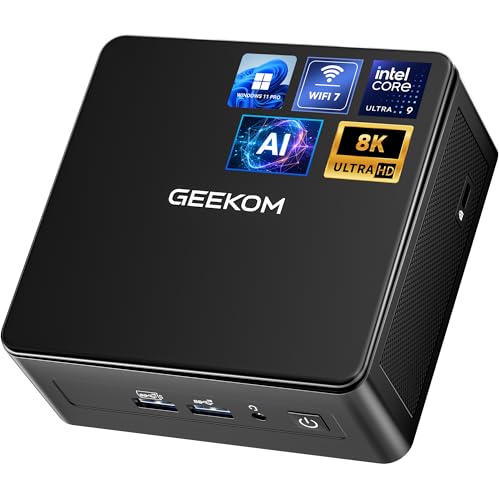
GEEKOM IT15, The Most Powerful AI Mini PC with Intel Ultra 9 285H(15th Gen) 99 Tops | 32GB DDR5, 1TB SSD | Arc 140T GPU | WiFi 7, 8K Quad Display, Win11 Pro, Video Editing, Coding, and Multitasking
[GEEKOM IT15 For Video Editing, Coding & AI Tasks] Need to edit 4K/8K video, compile code, or run...
As an affiliate, we earn on qualifying purchases.
As an affiliate, we earn on qualifying purchases.
Component Checklist for a High-Performance AI Workstation
| Component | Why It Matters |
|---|---|
| GPU | High VRAM (at least 24GB) for large models; CUDA cores for training speed; efficient cooling. The GPU is the heart of your AI system, directly influencing training speed and the size of models you can handle. Insufficient VRAM limits model complexity, which can hinder your ability to work with cutting-edge models or large datasets. Thermal management is equally critical—overheating can cause throttling, reducing performance and risking hardware longevity. Choosing a GPU with ample VRAM and robust cooling ensures your system remains performant and reliable during long sessions, ultimately saving time and avoiding costly hardware failures. |
| CPU | Fast multi-core processors (e.g., AMD Ryzen 9 or Xeon) for data preprocessing and multitasking. The CPU orchestrates data handling and prepares inputs for your GPU. A slow or bottlenecked CPU can create delays, especially when managing large datasets or complex preprocessing tasks. High core counts and fast clock speeds enable smoother workflows, reducing idle times and increasing overall throughput. This is especially important when running multiple tasks simultaneously or training large models where CPU-GPU coordination is critical for efficiency. |
| RAM | 64GB minimum for complex datasets; 128GB+ for large-scale training. Adequate RAM prevents data swapping—where your system relies on slower storage to hold active data—and allows you to load larger datasets directly into memory. This reduces training times and avoids bottlenecks in data loading and processing. For advanced AI projects involving extensive data or multiple concurrent tasks, more RAM provides the headroom needed for efficient operation and future growth. |
| Storage | NVMe SSDs for quick data access; multiple drives for separation of OS, data, and models. Fast storage speeds are essential for loading large datasets swiftly, saving models, and retrieving data during iterative training cycles. Separating storage for OS, datasets, and models can prevent I/O bottlenecks, ensuring smooth operation. High-performance NVMe drives also minimize downtime during data transfers, enabling faster experimentation and reducing wait times, which directly impacts productivity. |
| Cooling | Liquid cooling or high-end air coolers to keep thermals in check during long sessions. Effective cooling maintains consistent performance by preventing thermal throttling, which can silently reduce GPU or CPU speeds during extended workloads. Overheating not only hampers performance but also risks hardware failure. Investing in quality cooling solutions ensures your system stays stable under continuous heavy loads, extending component lifespan and maintaining peak productivity. |
| Power Supply | Reliable, high-wattage (800W+) units with headroom for future upgrades. A robust power supply ensures stable electricity delivery, which is vital for system stability during intensive tasks. A high-quality PSU with sufficient wattage and headroom accommodates future upgrades such as additional GPUs or increased storage, avoiding the need for early replacements. This upfront investment in quality reduces the risk of system failures and downtime, protecting your hardware and data investment over time. |
Choosing the right parts isn’t just about specs; it’s about ensuring your system can sustain high workloads without thermal or power issues, which is discussed in detail in build vs buy guides. For example, pairing a quiet GPU with efficient cooling and a high-quality PSU ensures your system runs quietly and reliably during long training sessions, which can be critical for productivity and hardware longevity. Proper component selection directly affects your system’s stability, performance, and lifespan, making it a crucial part of your AI investment.

HP OMEN 45L Gaming 5090 Desktop PC, Intel Core Ultra 9 285K, GeForce RTX 5090, 128GB DDR5, 4TB SSD, Support 4-Display 4K, Light Studio, HDMI, DP, Wi-Fi 6E, Windows 11 Pro, AI-Ready Workstation Desktop
【High Speed RAM And Enormous Space】128GB DDR5 RAM to smoothly run multiple applications and browser tabs all at...
As an affiliate, we earn on qualifying purchases.
As an affiliate, we earn on qualifying purchases.
Cost, Support, and Flexibility: The Real Tradeoffs
Prebuilt systems often cost more, but they offer advantages in support and quick deployment, as explained in build vs buy a prebuilt AI workstation. upfront—factoring in assembly, validation, and support. A typical custom build might save you $200–$500 in parts but adds hours of assembly and troubleshooting. If you’re new to hardware, that’s a steep learning curve. However, the upfront premium for prebuilts often includes extensive testing and validation, which can save you from costly mistakes and delays later on.
Support is another big difference. A prebuilt comes with a warranty—sometimes up to 5 years—and access to expert tech support. When your AI model is crunching data, downtime isn’t an option, and having prompt support can mean the difference between a quick fix and days of troubleshooting.
Upgradeability varies. Many prebuilts use proprietary parts or limited upgrade options, which can limit future improvements and force you into vendor-specific upgrades. DIY builds, while requiring more maintenance, typically allow you to select standard parts and upgrade as needed, offering greater long-term flexibility. This tradeoff impacts how well your system can adapt to evolving workloads and technology advancements.
Understanding these tradeoffs helps you align your choice with your long-term goals: if you prioritize immediate performance and support, prebuilts reduce hassle; if you want maximum flexibility and potential cost savings over time, a DIY approach may be better. Each option’s implications for future upgrades, maintenance, and total cost of ownership are critical considerations that can influence your overall productivity and ROI.
FAQs: What You Really Want to Know About Build vs Buy
- Should I build or buy a prebuilt AI workstation? It depends on your budget, technical skill, and need for speed. Builders get control; prebuilts offer quick setup and support.
- Which option is cheaper over 3–5 years? Usually, building is cheaper if you handle upgrades and maintenance yourself, but recent shortages and bulk buying have leveled this advantage.
- How much performance do I lose by buying prebuilt? Not much—many prebuilts are tuned for peak performance. But, custom cooling and tuning can eke out extra speed and silence, giving a slight edge for those willing to invest extra effort.
- Are prebuilts good enough for local AI models? Absolutely—many high-end prebuilt systems handle large models with 24+ GB VRAM GPUs and custom cooling, making them suitable for serious AI workloads.
- What GPU and VRAM do I need? For most AI tasks, aim for at least an RTX 4090 with 24GB VRAM; larger models or multi-GPU setups may demand more, but balancing cost and performance is key to avoid over-investing.
Best Use Cases: Who Should Build, Who Should Buy?
If you’re a researcher or power user who loves tinkering, building your own system lets you optimize for your specific workloads. For example, you might choose a custom liquid cooling loop for ultra-quiet operation during long training sessions, which can be tailored to your noise and thermal preferences, ultimately enhancing focus and system reliability.
Small teams or startups benefit from prebuilt solutions for rapid deployment and support—imagine launching a project in days, not months. This approach minimizes setup time, allowing teams to start experimenting and deploying faster, which can be crucial in competitive environments. Enterprise buyers often prefer vendors with SLAs, warranties, and validated hardware, minimizing risk and ensuring consistent performance across deployments.
Freelancers and content creators focusing on AI-assisted workflows might lean towards prebuilts for simplicity, reducing setup complexity and maintenance. Meanwhile, heavy-duty AI research with multi-GPU setups often demands custom builds for maximum performance and upgradeability, providing the flexibility to scale and adapt as research demands evolve.
Frequently Asked Questions
Should I build or buy a prebuilt AI workstation?
If you prioritize quick setup, support, and minimal hassle, a prebuilt often makes sense. But if you want customization, upgrade paths, and the satisfaction of tinkering, building your own rig pays off.Which option is cheaper over 3–5 years?
While DIY can often be cheaper in parts, recent shortages and bulk buying mean prebuilts sometimes match or beat DIY costs, especially when factoring in support and time saved.How much performance do I lose by buying prebuilt?
Most prebuilts are tuned for peak performance, but custom cooling or overclocking can give you small advantages—though they come with more maintenance. The difference is often minimal for most users, but for ultimate performance enthusiasts, tuning and custom cooling can provide slight gains.Is a prebuilt workstation good enough for local AI models?
Yes, many high-end prebuilts feature GPUs with 24+ GB VRAM and robust cooling systems, handling large models reliably. They are designed to meet the demands of serious AI workflows without the need for extensive modifications.What GPU and VRAM do I need?
A GPU like the RTX 4090 with 24GB VRAM is a strong baseline for most AI tasks; larger models or multi-GPU setups may require more. However, balancing cost and performance is key—over-investing in hardware that exceeds your needs can be inefficient.Conclusion
The choice between build and buy isn’t just about dollars—it’s about control, speed, and peace of mind. In 2026, what matters most is matching your workload and support needs to the right approach.
Remember, a well-chosen prebuilt can be your reliable partner; a custom build can be your masterpiece. What’s the right fit for your AI journey?